Cookie Consent Management Platform
Digital Anumati is cookie management software that scans your site, classifies what it finds, and gives visitors a consent banner with real choices — blocking scripts until consent is granted, and keeping a record of what was agreed to.
Get Started With Digital Anumati
Cookies and Trackers Are Easy to Add, Hard to Keep Track Of
Analytics tags, ad pixels, embedded widgets, and third-party scripts get added to a site over months or years, often by different teams. Without a current inventory, most sites end up with a gap between what the cookie policy says and what's actually running.
The banner shows, the scripts still fire
A consent banner that isn't wired to a blocking engine is just a message. Analytics and marketing scripts loaded elsewhere in the page's code can still fire before — or regardless of — what a visitor chooses.
Third-party embeds bring their own trackers
A payment widget, chat plugin, video embed, or social share button can each load their own cookies. Nobody on the team necessarily signed off on them, and they rarely show up in a cookie policy written before the embed was added.
The cookie list goes stale
A scan done once at launch stops reflecting reality the moment a new plugin, tag, or marketing pixel is added — and most teams don't have a process to notice when that happens.
What the Cookie Management Platform Covers
Cookie Scanner
Crawls your website to find every cookie and tracking script in use, including ones added by third-party embeds and ad tags — refreshed on a schedule, not just at setup.
Cookie Classification
Every cookie the scanner finds is sorted into a category — necessary, functional, analytics, or marketing — using a built-in ruleset plus manual review for anything ambiguous.
Cookie Consent Banner
A configurable banner shows visitors what's being categorised, with accept, reject, and customise options per category — matched to your site's language and branding.
Cookie Blocking
Non-essential scripts stay blocked until a visitor consents to that category, and are unblocked or re-blocked automatically if the visitor changes their preference later.
Tracker Management
Third-party trackers are grouped with the vendor and purpose behind each one, so you can see which analytics, marketing, or embed providers are active on a given page.
Consent Records
Each visitor's choice is timestamped and stored, giving your team a record of what was shown, what was chosen, and when — to reference if a consent choice is later questioned.
Consent Renewal
Consent is re-requested on a configurable interval rather than assumed to hold indefinitely, and a visitor can reopen their preferences at any time to change an earlier choice.
Scan Reports & Exports
Every scan produces a readable report of cookies found, their category, and their source — exportable for your own records or to compare against your published cookie policy.
| Capability | What You Get |
|---|---|
Cookie Scanner | A refreshed inventory of every cookie and script in use, including third-party embeds |
Cookie Classification | Each cookie sorted into necessary, functional, analytics, or marketing |
Cookie Consent Banner | A configurable, multi-language banner with per-category accept/reject controls |
Cookie Blocking | Non-essential scripts held back until a visitor consents to that category |
Tracker Management | Third-party trackers grouped by vendor and purpose alongside cookies |
Consent Records | A timestamped log of what was shown, chosen, and when, per visitor |
Consent Renewal | Preferences re-requested on a configurable interval, reopenable anytime |
Scan Reports & Exports | An exportable report to check against your published cookie policy |
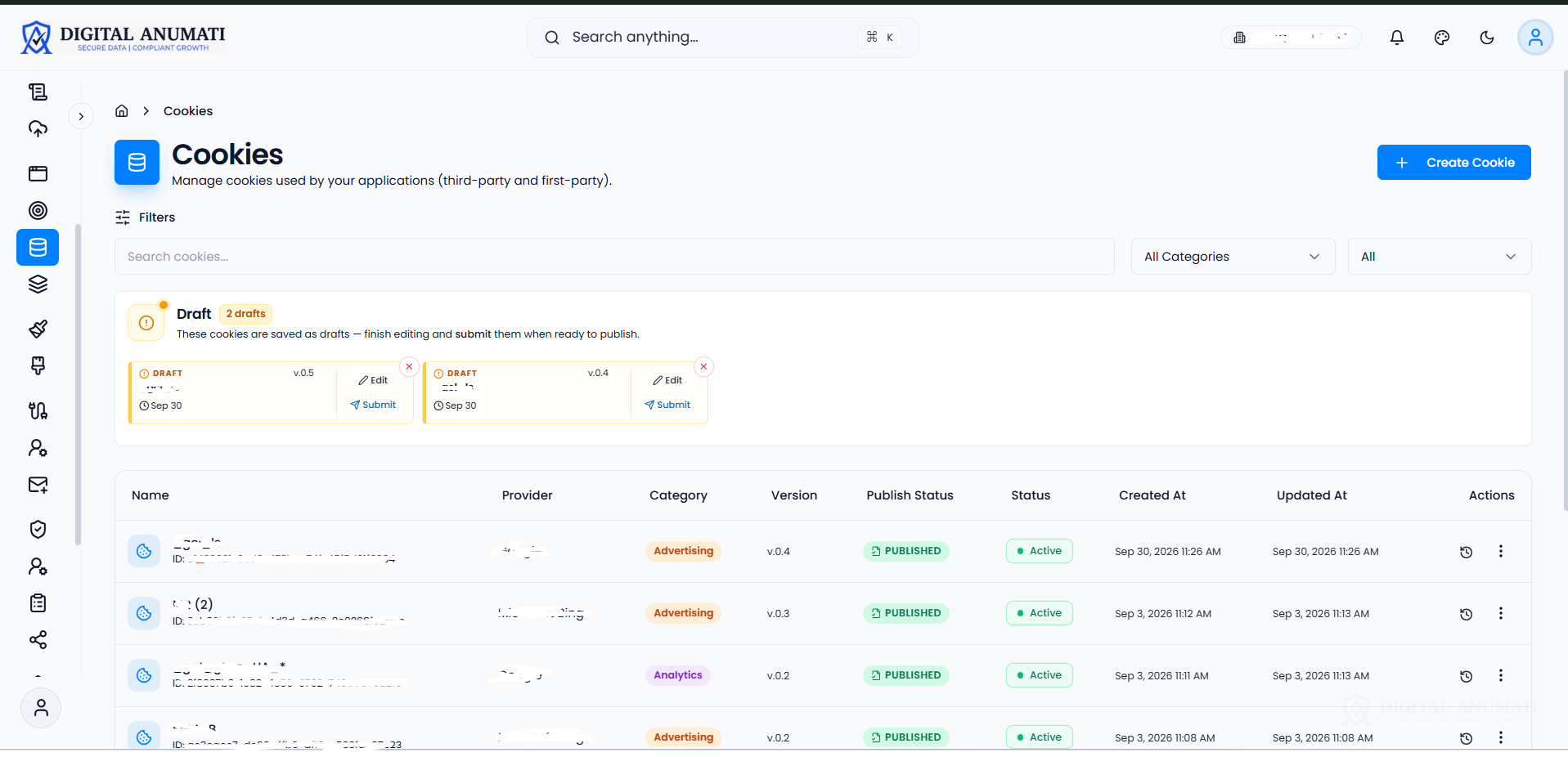
See Cookie Management In the Product
Scan your sites, categorise cookies, and manage visitor choices from one dashboard.
Built for Every Type of Website
E-commerce
Checkout flows often carry payment, logistics, and retargeting scripts side by side. Cookie categorisation keeps marketing pixels separate from the cookies needed to complete an order, so declining one doesn't block the other.
BFSI, Healthcare & Education
These sites tend to run more embedded third-party widgets — chat, video, scheduling, payment gateways — each with its own tracker. Cookie and tracker management gives visibility into what those embeds actually load.
SaaS & Marketing Sites
Marketing tags, ad pixels, and attribution scripts accumulate fast on a growth-focused site. Scheduled rescans catch new ones as campaigns and tools change, instead of relying on someone updating a spreadsheet.
Content & Media
Ad networks, comment widgets, and embedded video players are common sources of third-party cookies on content-heavy sites. The scanner surfaces these even when they're loaded by a plugin rather than the site's own code.
Cookies Sorted Into Categories Visitors Actually Understand
Cookie categorization is what turns a scan result into something a visitor can make a decision about. Digital Anumati groups every cookie into one of four standard categories, so the consent banner asks a clear question instead of listing raw script names.
Necessary cookies stay on by default since the site can't function without them; every other category is off until a visitor opts in.
Necessary
Required for login, security, and core site function
Functional
Remembers preferences like language or region
Analytics
Usage and performance measurement
Marketing
Ad targeting and retargeting pixels
A Banner That Actually Enforces What It Shows
As a cookie consent management platform, the banner isn't a one-time popup disconnected from the rest of the page — the category toggles it displays are the same ones the blocking engine reads, so what a visitor sees and what actually loads stay in sync.
Preferences are re-shown on a configurable renewal interval, and visitors can reopen the banner at any time to change a choice they made earlier.
From First Scan to an Enforced Banner
Scan
The cookie scanner crawls your site and lists every cookie and script it finds.
Classify
Each result is sorted into a category, with manual review available for edge cases.
Configure Banner
Set the banner's categories, language, and appearance to match your site.
Enforce Blocking
Non-essential scripts stay blocked until a visitor consents to that category.
Monitor & Rescan
Scheduled rescans catch new scripts added after launch, before they go unmanaged.
Works With Your Existing Stack
A single script tag deploys the scanner, banner, and blocking layer on most websites. Ready-made plugins are available for WordPress and Shopify, and a REST API and SDKs are available for teams that want to build a custom banner UI on top of the same scan and consent data.
One Cookie Compliance Platform, Not a Bolt-On Banner Script
Scan-Linked Blocking
Blocking rules come from the same scan and classification data the banner displays, so the two don't drift apart over time.
Indian Language Support
Banner text and category labels are available in multiple Indian languages, not just English.
DPDP-Aligned Defaults
Category structure and consent-first blocking are set up to align with the DPDP Act's consent requirements out of the box.
Connects to Your Consent Platform
Works alongside Digital Anumati's broader consent management platform, so cookie consent isn't a separate silo from Data Principal rights and audit records.
Scheduled Rescans
Automatic rescans flag new or changed trackers instead of relying on someone remembering to check.
Drop-In Install
A single script tag deploys the scanner, banner, and blocking layer without re-platforming your site.
Why a Banner Alone Isn't Real Consent
Cookies and trackers often collect device identifiers, IP addresses, and behavioural data that can identify a visitor — which means consent for them has to meet the same bar as consent for any other personal data: clear notice, a real choice, and the ability to withdraw, not a banner that shows once and is forgotten.
In India, that bar comes from the DPDP Act, and Digital Anumati's cookie management platform is built to meet it — while working the same way regardless of which framework a business is answering to.
Built for Every Team That Touches Cookie Consent
Data Protection Officers & Privacy Teams
A dated, exportable scan report and consent log gives a clear record of what cookies ran, how they were categorised, and what each visitor agreed to — evidence to point to if a consent choice is ever questioned.
Marketing & Growth Teams
Categorisation keeps analytics and ad pixels separate from the cookies a site needs to function, so an overcautious banner doesn't block marketing tags for visitors who've actually consented to them.
Legal & Compliance Teams
Category rules and consent-first blocking are configured once and applied site-wide, so a review starts from a current cookie inventory instead of auditing scripts page by page.
Web & Engineering Teams
One script tag replaces manually wiring consent checks into every tag manager entry, and scheduled rescans catch new scripts added after launch without engineering having to track it by hand.
Cookie Management Platform FAQs
What is a cookie management platform?
A cookie management platform is software that scans a website for the cookies and trackers it uses, sorts them into categories, shows visitors a consent banner, and blocks non-essential scripts until a visitor agrees to that category.
How is a cookie management platform different from just adding a consent banner?
A standalone banner only displays a message — it doesn't necessarily know what scripts are actually running on the page or stop them from loading. A cookie management platform ties the banner to a live scan and a blocking engine, so the categories shown match what's actually being blocked or allowed.
What does the cookie scanner actually check?
It crawls the pages of your site and records every cookie set and every tracking or third-party script it can detect, including ones loaded through embeds, widgets, and ad tags — not just first-party cookies set directly by your own code.
What is cookie classification and categorization?
Classification is the process of identifying what a cookie or tracker does; categorization is grouping it into a standard bucket — typically necessary, functional, analytics, or marketing — so a visitor can make one decision per category instead of reviewing scripts individually.
Does cookie blocking break any site features?
Necessary cookies required for login, security, and core functionality are never blocked. Functional, analytics, and marketing scripts stay blocked only until a visitor consents to that specific category, so features tied to a declined category simply won't activate for that visitor until they opt in.
What counts as tracker management, separately from cookies?
Not every tracking mechanism is a browser cookie — some scripts use local storage, fingerprinting-adjacent techniques, or server-side tags. That's why cookie and tracker management is treated as one connected job here: trackers are governed alongside cookies, tied to the same vendor and purpose, so nothing is left out of the consent picture.
Is this the same as Digital Anumati's DPDP consent management platform?
They're related but distinct: the cookie management platform handles website cookies and trackers specifically, while Digital Anumati's broader consent management platform also covers Data Principal rights, consent for non-cookie personal data, and audit workflows under the DPDP Act. The two connect so cookie consent isn't managed separately from the rest of your consent programme.
How often does the site get rescanned for new cookies?
Rescans run on a configurable schedule, so a script added after launch — through a new plugin, embed, or marketing tag — gets picked up and classified rather than running unmanaged until someone notices it.
How long does it take to install a cookie management platform?
Most sites deploy the scanner, banner, and blocking layer with a single script tag, or a WordPress or Shopify plugin, in under a day. The first scan then runs on its own schedule to build the initial cookie inventory.
Can the consent banner be customised to match our site's design?
Yes — banner layout, colours, copy, and language can be configured to match your site, and the underlying category structure stays the same regardless of how the banner is styled.
Does the platform cover cookies set by third-party embeds and widgets?
Yes — the scanner is built to detect cookies and trackers loaded by embedded widgets, payment gateways, chat tools, and similar third-party scripts, not only cookies set directly by your own site code.
What happens if a visitor changes their mind after accepting cookies?
Visitors can reopen their preferences at any time and change a category from accepted to declined. Scripts tied to that category are blocked going forward, and the updated choice is recorded with its own timestamp.
Other Digital Anumati Capabilities
Cookie management is one part of a DPDP compliance programme — these connect to it directly.
See Your Site's Cookie and Tracker Inventory
Run a scan to see what's actually collecting data on your site today, before configuring a banner around it.
Talk to our team about your current cookie setup